• Skip to primary navigation
  • Skip to main content
  • Skip to primary sidebar
  • Money Management
    • Debt Reduction
    • Credit
    • Mortgages
    • Mutual Funds
    • Tax Strategies
    • Loans
  • Budgets
    • Saving Money
    • Income
  • Banking
    • Checking Accounts
    • Check Writing
    • Fraud
    • History
  • Entrepreneurs
    • Entrepreneur Interviews
    • Money Making Ideas
    • 3D Printing
  • Resources
  • Retirement
  • About
    • Privacy Policy

Personal Finance Blog

Tips And Stories To Help You With Managing Money

  • Privacy Policy
  • Saving Money In 2018
You are here: Home / Archives for Internet

Internet

Social Media May Affect Your Career

January 6, 2015 By Twila Van Leer

Don't lose out on a job because of something you have said online.
Don’t lose out on a job because of something you have said online.
Everybody does it these days – uses social media in almost any setting. On the job, it can be very useful, but it also can be a huge stumbling block if what you share is detrimental. The impression you leave with a prospective employer, for instance, could be diametrically opposed to the one you intended. So use it, but use it wisely.

Reppler, a social media monitoring service, reports that 91 percent of employers use channels such as Facebook, Twitter and Linkedin to assess a prospective hire. Social medic profiles might give more information about a job-seeker’s personality and character than they imagine. Even passing remarks can be misinterpreted. You have the right to comment on controversial issues and to use profanity, but remember that the person who picks it up may object to such uses of the language.

If you want personal information kept private, don’t splash it on a post or tweet sites. If it’s something you probably wouldn’t tell anyone except a very good friend, you probably don’t want to share it with someone who is considering you for a job. And it may not even be you who makes the less-than-acceptable comment. What your friends have to say about you on social media could have an effect. Screen those you intend to interact with on social media and block those whose comments could hurt you if read by others.

Security features on social media applications change often. Stay current if you want to know how private your information is. Police your sites and lock down information as you feel it to be necessary.

If you comment negatively on your boss or the job, expect that it might become public. Even if the individual you have made the negative comments about is not on your list of friends, he or she may become aware through gossip. Maybe it can’t be easily traced back to you, but text is hard to discredit. Better be safe than sorry and unemployed.

On the positive side, social media can be very valuable in networking with others in your field. Share your ideas through industry-based groups and organizations. Logs and websites can help in the job hunt.

Social media obviously is not going away anytime soon, so expect that more aspects of your life, including your job, could become public. Just use caution to ensure that it doesn’t become a negative factor in that important phase of your life.

Filed Under: Internet Tagged With: Employment

20 Tips To Writing A Good Press Release

October 29, 2012 By Sherry Tingley

writing a good press release
Trends For Interest in Writing Press Releases

Over the past two years, interest in writing press releases has decreased according to Google Insights for search. Prior to that there was a considerable amount of interest in press release writing. With the economy improving, interest has picked up a little. Learning how to write a good press release may be the key to whether you and your family dine at McDonald’s’  or at the Outback Steak House.

The benefits of writing a good press release and submitting it to press release websites are numerous. Widespread distribution of your announcements can build relationships, trust and hopefully more revenue. There are many sites that allow you to submit your release and the cost varies from free up to several hundred dollars.

If you follow these basic tips, you can get past writer’s block and start producing something people will want to read.

1. Research your topic.
2. Write professionally. Avoid exaggerations.
3. Answer the question, Why should anyone care?
4. Make your press release timely and unique.
5. Choose to highlight something unusual.
6. Discuss a study or real life example.
7. Clearly state the problem your company solves.
8. Highlight compelling industry trends.
9. Use real life examples.
10. Make the headline a summary.
11. The first paragraph should clarify your news.
12. Use the body of the press release to provide the details.
13. Tie your news release to current events, recent studies, trends and social issues.
14. How does your product or news satisfy desires?
15. If possible, provide a killer news hook for your story.
16. Attach images, videos, links, pdf document or any other materials that enhance your release.
17. Celebrate an anniversary, new president, or new employee.
18. Announce a new product line or service.
19. Promote community events.
20. Write it. Proofread it. Print it. Proof again.

According to www.prweb.com, a popular press release website, Amy Mauzy with Malibu Boats says:

“Thanks to PRWeb, we are leaving our mark on both mainstream and industry media… our Malibu Boats brand is getting the attention it deserves… and we are quantifying all of it. The true value of PRWeb is in the sales it has helped us generate.”

Janet Meiners Thaeler‘s new book, “I Need a Killer Press Release” provides a road map for you to use in establishing your company or brand name. It goes into further detail of exactly how you write press releases and submit them on the web.

Hopefully these tips will help you at least start thinking about your next press release might be. It is a good marketing strategy to use when building a small business online. Be sure to stop back and tell us how it went.

Filed Under: Internet Tagged With: internet business

How To Control Your Privacy On Facebook

February 29, 2012 By Sherry Tingley

When you have over 500 friends on Facebook, you may think that you are stuck with reading news feeds from everyone. Save yourself some time by organizing your streaming updates. Facebook has made it very easy to read news feeds from only those you are interested in following.

Facebook Lists

How do you do filter out your stream of updates? Through Facebook Lists. Facebook lists make it possible for you to organize your friends into groups. You decide the group names and you pick the people you want in your groups. You might organize by family members, close friends, friends in the geographic area you live, work friends, high school friends or special interests like hobbies.

You will notice on the left side of the page a column called lists. If you hover over the word “lists” you can the word “more” to the right of the lists. Click on more. You will see a list of any current lists you have created. You can click on “create lists” to add new lists. There you will be asked to choose people you want to assign to the new list.

When you want to see the updates from each list, you just click on list name which is located on the left side of your Facebook account. You will save hours of reading through posts by people you really have little interest in following.

Smart Lists

What is a smart list? Facebook has created a function that will create lists automatically for you based on your profile. If you have listed a school you have attended, the list will appear automatically. Work, school, family and city are common auto created lists.

Control Who Sees Your Updates

Probably the most important privacy feature you should learn to use is choosing the audience of your status updates. When you make an update, there is now a drop down list in the bottom right corner of the status update box. This is where you can select which list you want to post your updates to. This allows you to choose who sees and reads your posts. Gone are the days where everybody sees all your posts. Finally a decent way to reclaim your privacy.

Using these features of Facebook can really help you enjoy the social experience much more. So if you have been hesitant to post because you are concerned about who sees and reads your posts, that problem is now solved. Share your private posts with those you actually want to share with.

Find out more about the author at the popular Personal Finance Blog, where you can share success stories about business start ups or get outstanding deals on business checks.

Filed Under: Facebook, Internet Tagged With: facebook

What You Can Learn From Reading Google Patents

October 14, 2010 By Sherry Tingley

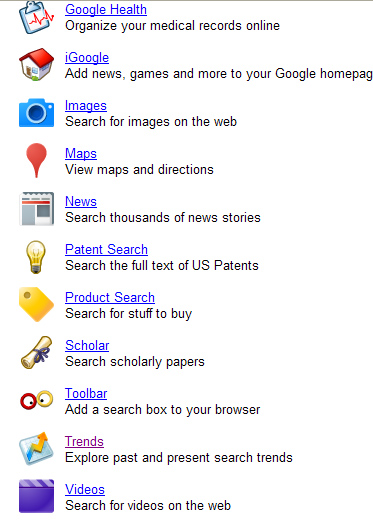
Google patent search allows you to search for patents that are registered with the government. Their advanced search allows you to state several search parameters. You can search by patent number, company or individual who was given the patent, date of getting the patent, date of filing the patent and several other options.

When you search all the patents filed and assigned to Google, Inc. you will get back a plethora of information. If you want to know what Google is up to in new developments, you can search by their most recent filings.

Google Patent Search

Recent filings for 2010 include search query optimizations for business listings. Businesses will benefit from the new patent because it will deliver more relevant business results. For example, when a searcher does a search for film development an association can be made with the words photo finishing even though the two words have no actual words in common. Refining a process of categorizations for businesses can help return better search results.

Google uses training data to artificially learn from search entries. According to the patent filing, the first thing that needs to be done is to create business categories relevant to specific search queries. The categorization classification component can learn from the search queries and business categories, based on training data. Data is selected from predefined yellow page listings, categorized business websites, consumer report information, restaurant guides, query traffic data and advertising data. The input is then stored as a series of possibilities.

If you are totally baffled by now, just know that business searches are going to become much more relevant, which is good news for business websites.

Try a search in the Google patent search and see what you come up with. Perhaps you’ll search by patent number and learn that patent number 1,000,000 was for an improvement made in vehicle tires, patented in 1911.

Filed Under: Internet Tagged With: internet business

Internet Privacy Policy With Goggles

August 24, 2010 By Sherry Tingley

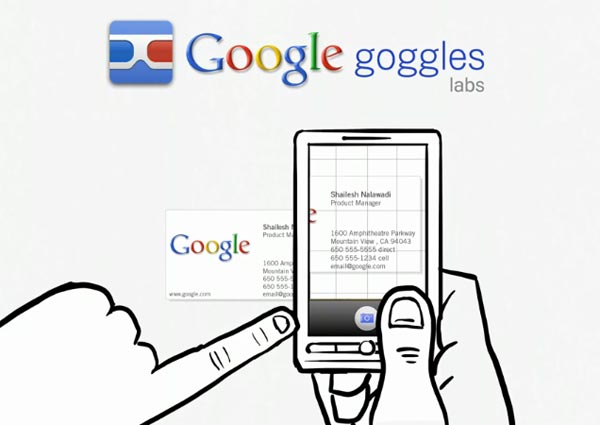
Goggles captures business information easily.

On August 24, 2010, the L.A. Times published a photo of a man who had just stolen a  $9,200 Rolex gold watch from Classic Design, a store in the California, Glendale Galleria mall. The Glendale police department requested help in identifying the man in the photo. As this photo circulates the Internet and reaches more and more people, it will likely reach someone who can identify this person and help apprehend him.

Technology probably could in the near future identify this man with the use of Goggles by Google. Although David Petrou, a project lead of Google Goggles, claims that for privacy reasons, Google does not do facial recognition, one could see that it would certainly be helpful in catching criminals.

Currently, the new Goggles software allows cell phone users to snap photos and send them to  Google’s cloud services. Computer vision algorithms organize search results and provide you with  information about what you are seeing. In order for Google to identify the correct information in the picture, it has to compare it with an existing database. They already have 150,000 images for landmarks which give correct results only 50% to 60% of the time. Goggles can also be used with  logos, contact info, artwork, businesses, products, barcodes, or text.

The primary use for Goggles is in language translation,  helping people traveling in foreign countries. The user can photograph signs, menus, and other text related items and the output will be in the users native language. Goggles can translate English, French, Italian, German and Spanish.

Given the rapid development of technology in the last fifteen years, one wonders what life will look like in 2030. Will someone have developed the Goggle technology to be accurate 99% of the time?  Will society agree to allow law enforcement officials to  use a perfected facial recognition software in their pursuit of criminals? Will people be able to snap a photo of you and find out instantly where you are from? What does the future hold for us?  What do you think?

Filed Under: Internet Tagged With: Internet

  • « Go to Previous Page
  • Page 1
  • Page 2
  • Page 3
  • Page 4
  • Interim pages omitted …
  • Page 10
  • Go to Next Page »

Primary Sidebar

Personal Finance Articles

  • Make Saving A Priority
  • Review Your Home-Insurance Risks
  • Lowest Air Fare? Try August 28
  • Hackers Targeting Bitcoins
  • Keep Your Emergency Fund Intact

Save At Walmart

Search

Personal Finance Education

Investing Education from Morningstar.

As Seen On Intuit

Intuit.com has ranked Coolchecks.net #4 out of 10 of the best blogs to help you save money. We hope to help you become more aware of your own financial situation and strive to improve it.

Featured On Mint.com – July 2014

Mint Interview

Categories

  • Banking
    • Check Writing
    • Checking Accounts
    • Credit Cards
    • EMV Cards
    • Fees
    • Fraud
    • History
    • Student Loans
  • Best Of The Web
  • Budgets
    • Emergency Fund
    • Grocery Shopping
    • Saving Money
    • Spending Habits
  • Business
    • 3D Printing
    • Bankruptcy
    • Business Advertising
    • Business Development
    • Business Plans
    • Corportate Lessons
    • Data Mining
    • Legal Issues
    • Merchants
    • SEC
    • Security
    • Small Business Startups
  • Consumer Alerts
  • Cryptocurrency
  • Cutting Costs
  • Employment
    • best places to work
    • Careers
    • Interviews
    • Job Search
    • Top CEOs
    • Wages
  • Entrepreneurs
    • Attitudes
    • Entrepreneur Interviews
  • Featured
  • Finance
    • Automobiles
    • Credit Ratings
    • Education
    • Financial Planners
    • Foreclosures
    • Homes
    • Insurance
    • Investing
    • Mortgages
    • Personal Finance
    • Renting
    • Term Deposits
    • Travel
    • Work
  • Fraud
  • Government
  • Holidays
    • Christmas
    • Halloween
  • Internet
    • Bitcoin
    • Blogging Tips
    • Blogs, RSS and Podcasting
    • Databases
    • Facebook
    • Influence
    • marketing
    • Twitter
    • Website Reviews
    • WordPress
      • Key Words
  • Investing Basics
    • Hedge Funds
    • Investing
    • Mutual Funds
  • Life
    • Aging
    • Just For Fun
      • Punahou Alumni Corner
    • Millennials
    • Personal Health
  • Money Making Ideas
    • Affiliate Programs
    • Craigslist
    • Ebay
  • Money Management
    • Bankruptcies
    • Building Wealth
    • Child Care Costs
    • Christmas Shopping
    • Credit
      • Free Credit Report
    • Debit Cards
    • Debt
    • Debt Reduction
    • Health Insurance
    • Income
    • Inheritance
    • Interest Rates
    • Loans
    • Mortgages
    • New Years Resolutions
    • Retirement
    • Shopping Tips
    • Tax Strategies
    • Your Stories
  • Retirement
  • Self Improvement
    • Time Management
    • Work Habits
  • Shopping
    • Coupons
    • Online Shopping
  • Social Security
  • Tax Tips
  • Taxes
  • Technology
  • Trade
  • Uncategorized
  • Wealth

Best of Personal Finance Blogs

Best of BuyerZone Business Finance Blog Recipient

Personal Finance Sites We Recommend

Get personal finance advice from the people behind the top money blogs, including Wise Bread, The Simple Dollar, Mint and Nerd Wallet.

Copyright © 2026 ·Metro Pro · Genesis Framework by StudioPress · WordPress · Log in