The Social Media Golden Triangle
August 23, 2009 by Sherry Tingley
Filed under social media
If you have been baffled and confused and just don’t know where to start with social media, you must not have heard of the Golden Triangle. The Golden Triangle was lost thousands of years ago… Wait! That’s a different story, this one was discovered within the past two years!
This is a story of how the Social Media Golden Triangle can completely transform the way you communicate with your clients and customers and your business. We all know that economic times have changed. You have been hearing about Social Media, Social Networking, Viral Video and many other social media outlets that you wish you could leverage and turn into business.
What I’m about to discuss is nothing new, but it is a strong force that if used properly, will change the course of your business.
You have undoubtedly heard a lot of hype and hoopla around Facebook, YouTube and Twitter. These three sites make up “The Social Media Golden Triangle”. Now is the time to put them to work for your business. Using the Golden Triangle can help you identify, attract, and interact with your target audience. This powerful combination of websites can take you from just barely surviving to thriving in the current economy.
Let’s look at each piece of the Golden Triangle separately so we have a basic understanding as to what each piece does:
Twitter is a new tool designed to keep things short and sweet. There’s no time for industry jargon, just tell me how it is and I’ll decide if it’s worth my time to view your full message. Part branding strategy, part relationship development, Twitter is one of the most popular and fastest growing websites on the Internet today. Twitter is a pitch free zone, don’t bother pitching your products or service, think and write frequently and consistently. Be sure to offer value, how can you help your followers.
Social media marketing, actually, marketing in general shouldn’t be about you!
Yes I said it, in fact your company isn’t about you, it’s everything to do with your customer or client. Your website isn’t about you it should be about your clients or customers problems and how you can solve them.
A strategy to leverage Facebook is to create groups around the problem you solve, not the product or service you offer. People aren’t looking for the solution by name, they are searching for the solution to their problem, so start by talking about their problems .
YouTube
Know it, Like it and Trust it…If “you can’t believe everything that you hear,” “seeing is believing” and a picture is worth a thousand words, then video must be the “it”.
Done right, you can connect with, and get your audience to know, like and trust you.
Again, we are in a NO Pitching Zone, where people are more concerned with content and value than hearing what you have to offer. In videos, be yourself, talk about the problem your target audience may be having and ways you can help solve them. Educational videos position you as the expert and help you attract the right people, they also help people solve their problems, making you look like problem solver.
Bringing it All Together
Think about it, what we are addressing here is the need for communication with the people you want to get in front of, how to leverage you website better how to leverage all of these people flocking to these social media sites. How to get your message in front of them without pissing them off and just posting advertisements Social media isn’t just a new way to communicate, it’s a completely different culture and needs to be approached carefully when used as a marketing tool for your business.
Before jumping in and starting a campaign, learn each piece of the triangle’s culture first, social media users want value, not fluff and advertisements.
By Dan Beldowicz
Article Source
Dan Beldowicz is the Senior Marketing Consultant at Single Throw Internet Marketing. Online for over 11 years, Dan is helping companies develop websites that generate business and social media campaigns that connect with customers. Follow Dan on Twitter at http://twitter.com/danbeldowicz or on the Single Throw Blog.
How to Use TweetDeck To Help You Twitter
June 4, 2009 by Sherry Tingley
Filed under Twitter
Learning how to use Twitter is easy for some people, but for others, it is a struggle. If you sign up for a twitter account at twitter.com, you can easily see how to use Twitter, but you might wonder how you can possibly manage following more than ten people.
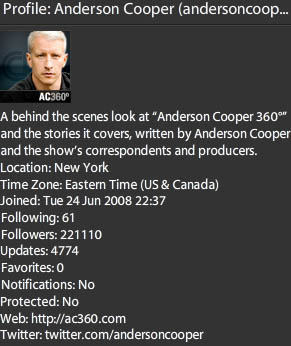
Actor Anderson Cooper was on the Kelly and Regis show this morning discussing twittering. Not only were they discussing twittering, he was twittering during the show. Kelly Ripa admitted she doesn’t Tweet. I think it’s time now that she learns how to twitter. Anderson not only is a twitter fan, but has 221,110 people following him. He actually used his phone to twitter during the show.

Twitter applications have been developed to help you manage your twitter friends. I’ve read and heard about a lot of applications, but the one I like the best is called TweetDeck and you can download it from TweetDeck.com. To the left you will see Anderson Cooper’s profile that you can access from TweetDeck.
What is fun about TweetDeck is that it has a tracking capability that let’s you track certain people or keywords that people are talking about. It gives you 10 columns to use. For each column, you choose what you want to appear in that column.
For example, if you want to create a group of people that you know personally you can see what they are saying and their comments are all listed in one column. If you are tracking what people say about Iphones, you can choose that as a keyword and have a column for all the tweets about Iphones.
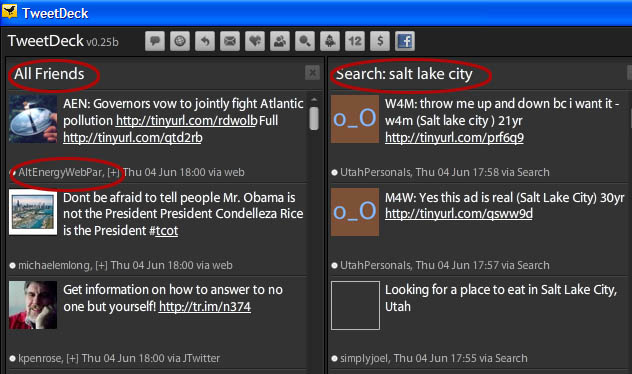
The reason that is fun is because you can then begin conversations with people who are talking about things you are interested in. In the photo below, you can see a sample of TweetDeck. I am only showing two columns because of space limitations, but you can have up to ten. There is a slide bar at the bottom of the application that let’s you quickly view all of the columns. You can also change your groups whenever you want.

Tweetdeck is free and very addicting. Be prepared to have a whole new world of friends. My twitter name is bluewaves1. Join me in twittering today.
Let me know what your favorite Twitter application is by making a comment here.
Increase your Twitter followers
March 12, 2009 by Sherry Tingley
Filed under Twitter
Twitter.com has become increasingly popular amongst the social media fans as well as big corporations. In a record 45 days some Twitter users have experienced an incredible growth spurt. The number of Twitter followers sometimes is an indicator of the amount of authority one has. Arguably this may or may not reflect the actual sphere of influence these people have, but it is amazing to look at the statistics of just how fast these people have grown their Twitter Communities.
The statistics in the chart below were taken from the website, www.twitterholic.com. They have measured 1000 Twitter users and recorded information about them. The Twitter URL for each person or company has been included for ease of use and to encourage people to check out just what is driving this rapid growth. By clicking on the URL, you can easily follow these companies or people on Twitter. If you want to increase your Twitter followers, follow these people.
| TOP 20 TWITTERS’ GROWTH IN 45 DAYS | ||
| # | Twitter Name | Increase in Followers – 45 Days |
| 1 | CNN Breaking News (cnnbrk) | 338,021 |
| 2 | Britney Spears (britneyspears) | 315,208 |
| 3 | Barack Obama (BarackObama) | 248,409 |
| 4 | Stephen Fry (stephenfry) | 216,669 |
| 5 | Whole Foods Market (WholeFoods) | 206,399 |
| 6 | NPR Politics (nprpolitics) | 206,399 |
| 7 | DowningStreet (DowningStreet) | 178,659 |
| 8 | Zappos.com CEO -Tony (zappos) | 159,912 |
| 9 | JetBlue Airways (JetBlue) | 128,349 |
| 10 | The Onion (TheOnion) | 86,592 |
| 11 | Live Earth (LiveEarth) | 82,466 |
| 12 | Threadless (threadless) | 60,852 |
| 13 | Mr Tweet (MrTweet) | 54,134 |
| 14 | Rich (BigRichB) | 42,072 |
| 15 | Starbucks Coffee (Starbucks) | 39,726 |
| 16 | Mr. Social (MrSocial) | 39,227 |
| 17 | Perry Belcher (perrybelcher) | 33,372 |
| 18 | astrospace (Astronautics) | 29,997 |
| 19 | Guy Kawasaki (guykawasaki) | 27,365 |
| 20 | Robert Scoble (Scobleizer) | 17,405 |
Just for fun, I analyzed Guy Kawasaki’s statistics. I guess I’m somewhat of a statistics freak. He increased his Twitter followers by 608 people a day for 45 days. If you visit his site listed on his Twitter page, you can see that he has a datafeed or aggregator of some kind that is posting for him, but he also posts himself. His Twitter influence is rapidly growing.
Brian Campbell recommends that in order to grow your Twitter followers, you find people who also reciprocate and follow other people back. With that in mind, the list below shows the top twenty Tweeps (people who use Twitter) that follow other people. Increase your Twitter followers by following these people.
| TOP 20 TWITTER FOLLOWERS | ||
| Name | Following | |
| 1 | Barack Obama (BarackObama) | 368,659 |
| 2 | DowningStreet (DowningStreet) | 198,866 |
| 3 | Whole Foods Market (WholeFoods) | 190,750 |
| 4 | Zappos.com CEO -Tony (zappos) | 177,605 |
| 5 | NPR Politics (nprpolitics) | 123,066 |
| 6 | JetBlue Airways (JetBlue) | 118,993 |
| 7 | The Onion (TheOnion) | 94,308 |
| 8 | Guy Kawasaki (guykawasaki) | 86,915 |
| 9 | Live Earth (LiveEarth) | 78,362 |
| 10 | Mr Tweet (MrTweet) | 77,079 |
| 11 | Robert Scoble (Scobleizer) | 74,584 |
| 12 | Starbucks Coffee (Starbucks) | 73,784 |
| 13 | Threadless (threadless) | 64,108 |
| 14 | Rich (BigRichB) | 62,504 |
| 15 | astrospace (Astronautics) | 62,211 |
| 16 | Perry Belcher (perrybelcher) | 57,664 |
| 17 | Arleen Anderson (AlohaArleen) | 56,192 |
| 18 | yobird (yobird) | 54,624 |
| 19 | Stephen Fry (stephenfry) | 54,322 |
| 20 | Casey Wright (caseywright) | 53,433 |
Join the growing number of people who are using Twitter.com. In fact, follow me on Twitter and we’ll have a great time. You can always comment below and leave your Twitter address to increase your followers!