• Skip to primary navigation
  • Skip to main content
  • Skip to primary sidebar
  • Money Management
    • Debt Reduction
    • Credit
    • Mortgages
    • Mutual Funds
    • Tax Strategies
    • Loans
  • Budgets
    • Saving Money
    • Income
  • Banking
    • Checking Accounts
    • Check Writing
    • Fraud
    • History
  • Entrepreneurs
    • Entrepreneur Interviews
    • Money Making Ideas
    • 3D Printing
  • Resources
  • Retirement
  • About
    • Privacy Policy

Personal Finance Blog

Tips And Stories To Help You With Managing Money

  • Privacy Policy
  • Saving Money In 2018
You are here: Home / Archives for Internet

Internet

30 Day Plan To Launching a New Website

August 2, 2009 By Sherry Tingley

This is a thirty day report of statistics on launching a brand new website and building substantial traffic in thirty days. Since this is August 2, 2009, my plan is to report on thirty days worth of effort in attracting traffic to a new website.  This post will be updated on a daily basis and each day’s advertising efforts will be reported as well as the number of visitors for the previous day. Since this will be an ongoing project throughout the month of August, I suggest you book mark the URL and check back to see the statistics change.

I’m not guaranteeing any great results, but if Julia Child could inspire a year’s worth of  trying a new recipe every day, then certainly I can find 5 minutes a day to update this post with the advertising efforts of this new site launch.  I’m sure there are plenty of people that are much better at this than I am and I encourage you to steer me in the right direction if I’m getting off target.

Let me explain that the reason for this concentrated effort. Not that I want any sympathy…well…maybe I do…but when you are a business owner you don’t have access to great health insurance.  Without health insurance coverage, I had an accident that, shook me up literally. I generously offered to help my aging mother hang draperies in her home. It was a nice thing to do,  I thought.  However within 5 minutes of arriving at her house, I had slipped off a desk and took a spill. On the way down, (you would never guess that in my teens I was a Hawaiian State Diving Champion) I managed to hit my back on part of the chair that had supported my body momentarily. As my body hit the floor, I knew it wasn’t going to be easy for me to get up and my mind raced with, YIKES…I have no health insurance.

To make a long story short, $9,500 later, which was only 24 hours, I was laid up at home with 2 broken ribs and a lot of pain medication. Well, I’m totally healed now and totally frustrated with how difficult and expensive it is to get health insurance when you work for yourself. I decided that I would have to make at least an extra $10K a year to even afford to buy myself health insurance.  So this is part of my effort to change my circumstances, learn more about launching a site from scratch and just see how fast it can be done. Maybe you will learn something from this if nothing more than you are really glad you have health insurance.

The actual creation of this new website is a lot of work, don’t get me wrong, but I figure that the hard part begins after the actual launch so I’m not going into details of the creation of the site, nor the domain name selection or anything but advertising.

The new website was completed on August 1. So here is the report for August 2009.

Filed Under: Affiliate Programs, Internet Tagged With: 30 Day Plan, Affiliate Programs

Blogging Tips From The Experts

July 3, 2009 By Sherry Tingley

Timothy Ferriss
Timothy Ferriss
While listening to Tim Ferriss on WordPress.tv I toke some notes that might help people with their blogging projects. Here are some of Tim’s best tips to make your blog better. Of course watching the video is ultimately the best thing to do, however reading this short digest may give you that extra “push” you needed to take your blog to the next level.

1. If you use the Category widget on your blog, change the name of the header to “Topics.” This dramatically changed the click through rate. It’s easy to do in WordPress 2.8. When adding that widget, just put the name you want in the form. Tim reports better responses with the title – Topics.

2. Sometimes an older post doesn’t have as much appeal as newer ones do. To fix this problem, you can display the dates on the bottom of your posts. To get this done, you need to change some coding on a file in your theme. You will have to look at the index.php file in the theme you have and find:

[php]<span class="time"><?php the_time(‘F j, Y’); ?></span>[/php]

You’ll need to comment that out by replacing that with:

[php]<!–<span class="time"><?php the_time(‘F j, Y’); ?></span>–>[/php]

Then you need to find this:

[php]<div class="date">
<div class="dateleft">
<p><span class="time"><?php the_time(‘F j, Y’); ?></span>
</div>
</div></blockquote>[/php]

and cut that (that means copy it and delete it) and paste it after:

[php]<?php the_content(__(‘Read more’));?><div style="clear:both;"></div>[/php]

Save that file and upload it to see the changes. If doing that scares you, ask someone to do it for you. 🙂

3. List the total read time for your reader. 250 words = about one minute. This helps prepare your reader for what you have written.

4. Write about what makes you angry without being negative about anyone in particular.

5. Write your post and then do SEO research after. Then make your keyword insertions or changes.

6. StumbleUpon is one of the cheapest sources of traffic there is. One post that ranks well can bring 40,000 to 50,000 page views.

7. Flickr has a section of photographs that you can blog about by going to the advanced search and then choosing Creative Commons, then most interesting. You can actually blog about a photo right from Flickr.

These are just some suggestions to make your blog better. Tim Ferriss has some great blogging tips!

Filed Under: Blogging Tips Tagged With: blogging, Blogging Tips

How to make WordPress an Ecommerce Store

July 3, 2009 By Sherry Tingley

wordpress-ecommerce-pluginsEcommerce Plugin For WordPress
WordPress is continuing to improve it’s functionality. For those of you who have WordPress blogs and want to sell a few items directly from your blog and you don’t want to worry about logging into PayPal and creating a PayPal button for every item you have, this Ecommerce plugin is the answer for you.

I have worked with a lot of people getting their WordPress websites ready for launching and so many of them would have been thrilled to know about this Ecommerce plugin that is now available for use. There is even a full video tutorial on how to turn WordPress blogs into Ecommerce sites. You can easily learn how to use this plugin by watching this video. You download the plugin and then basically fill in a form that allows you to add your products and your PayPal information.

Download the plug-in and turn your WordPress site into an ecommerce site.

Reflections
I recently discovered how how enjoyable it is to watch www.wordpress.tv. I like to work on the computer and listen to something in the background other than television so I feel I’m learning something new. I was delighted to listen to Tim Ferriss talk about all his well researched analytics on what works best on blogs and had a great time laughing at his funny video on how to peel a hard-boiled egg without peeling it the traditional way.

Matt Mullenweg WordCamp 2009

I also can’t get over how the young people in this world are the ones who are shaping everything on the Internet. Matt Mullenweg, a co-founder of WordPress, was only 19 years old when he and Mike Little developed the software for WordPress.  He  posted  programming questions on his blog and was contacted by Mike Little in England who offered to partner with him to work on his vision of WordPress. WordPress has become so popular that there are people who have WordPress tattoos!

MySpace, Facebook, Twitter…they are all being developed by people who were toddlers when computers were being perfected. Matt Mullenweg was listed by PC World as one of the top 50 most influential people on the Internet.

WordPress is my favorite platform to use. I’m not getting a tattoo, but I certainly enjoy using this software.  Thank you Matt!

Filed Under: WordPress Tagged With: Ecommerce, Ecommerce WordPress plugin, Matt Mullenweg, Tim Ferriss

How to Use TweetDeck To Help You Twitter

June 4, 2009 By Sherry Tingley

Learning how to use Twitter is easy for some people, but for others, it is a struggle. If you sign up for a twitter account at twitter.com, you can easily see how to use Twitter, but you might wonder how you can possibly manage following more than ten people.

Actor Anderson Cooper was on the Kelly and Regis show this morning discussing twittering. Not only were they discussing twittering, he was twittering during the show. Kelly Ripa  admitted she doesn’t Tweet.  I think it’s time now that she learns how to twitter.  Anderson not only is a twitter fan, but has  221,110 people following him. He actually used his phone to twitter during the show.  

anderson-cooper-twitter-profile

Twitter applications have been developed to help you manage your twitter friends. I’ve read and heard about a lot of applications, but the one I like the best is called TweetDeck and you can download it from TweetDeck.com.  To the left you will see Anderson Cooper’s profile that you can access from TweetDeck.

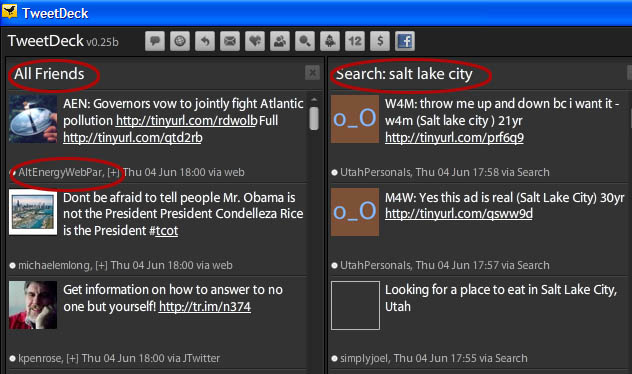
What is fun about TweetDeck is that it has a tracking capability that let’s you track certain people or keywords that people are talking about.  It gives you 10 columns to use. For each column, you choose what you want to appear in that column.

For example, if you want to create a group of people that you know personally you can see what they are saying and their comments are all listed in one column. If you are tracking what people say about Iphones, you can choose that as a keyword and have a column for all the tweets about Iphones.

The reason that is fun is because you can then begin conversations with people who are talking about things you are interested in. In the photo below, you can see a sample of TweetDeck. I am only showing two columns because of space limitations, but you can have up to ten. There is a slide bar at the bottom of the application that let’s you quickly view all of the columns. You can also change your groups whenever you want. 

tweetdeck


Tweetdeck is free and very addicting. Be prepared to have a whole new world of friends. My twitter name is bluewaves1.  Join me in twittering today.

Let me know what your favorite Twitter application is by making a comment here.

Filed Under: Twitter Tagged With: tweet, tweetdeck, Twitter

Increase your Twitter followers

March 12, 2009 By Sherry Tingley

Twitter.com has become increasingly popular amongst the social media fans as well as big corporations. In a record 45 days some Twitter users have experienced an incredible growth spurt.  The number of Twitter followers sometimes is an indicator of the amount of authority one has. Arguably this may or may not reflect the actual sphere of influence these people have, but it is amazing to look at the statistics of just how fast these people have grown their Twitter Communities.

The statistics in the chart below were taken from the website, www.twitterholic.com. They have measured 1000 Twitter users and recorded information about them.  The Twitter URL for each person or company has been included for ease of use and to encourage people to check out just what is driving this rapid growth. By clicking on the URL, you can easily follow these companies or people on Twitter. If you want to increase your Twitter followers, follow these people.

TOP 20 TWITTERS’ GROWTH IN 45 DAYS
# Twitter Name Increase in Followers – 45 Days
1 CNN Breaking News (cnnbrk) 338,021
2 Britney Spears (britneyspears) 315,208
3 Barack Obama (BarackObama) 248,409
4 Stephen Fry (stephenfry) 216,669
5 Whole Foods Market (WholeFoods) 206,399
6 NPR Politics (nprpolitics) 206,399
7 DowningStreet (DowningStreet) 178,659
8 Zappos.com CEO -Tony (zappos) 159,912
9 JetBlue Airways (JetBlue) 128,349
10 The Onion (TheOnion) 86,592
11 Live Earth (LiveEarth) 82,466
12 Threadless (threadless) 60,852
13 Mr Tweet (MrTweet) 54,134
14 Rich (BigRichB) 42,072
15 Starbucks Coffee (Starbucks) 39,726
16 Mr. Social (MrSocial) 39,227
17 Perry Belcher (perrybelcher) 33,372
18 astrospace (Astronautics) 29,997
19 Guy Kawasaki (guykawasaki) 27,365
20 Robert Scoble (Scobleizer) 17,405

Just for fun, I analyzed Guy Kawasaki’s statistics. I guess I’m somewhat of a statistics freak. He increased his Twitter followers by 608 people a day for 45 days. If you visit his site listed on his Twitter page, you can see that he has a datafeed or aggregator of some kind that is posting for him, but he also posts himself. His Twitter influence is rapidly growing.

Brian Campbell recommends that in order to grow your Twitter followers, you find people who also reciprocate and follow other people back. With that in mind, the list below shows the top twenty Tweeps (people who use Twitter) that follow other people. Increase your Twitter followers by following these people.

TOP 20 TWITTER FOLLOWERS
  Name Following
1 Barack Obama (BarackObama) 368,659
2 DowningStreet (DowningStreet) 198,866
3 Whole Foods Market (WholeFoods) 190,750
4 Zappos.com CEO -Tony (zappos) 177,605
5 NPR Politics (nprpolitics) 123,066
6 JetBlue Airways (JetBlue) 118,993
7 The Onion (TheOnion) 94,308
8 Guy Kawasaki (guykawasaki) 86,915
9 Live Earth (LiveEarth) 78,362
10 Mr Tweet (MrTweet) 77,079
11 Robert Scoble (Scobleizer) 74,584
12 Starbucks Coffee (Starbucks) 73,784
13 Threadless (threadless) 64,108
14 Rich (BigRichB) 62,504
15 astrospace (Astronautics) 62,211
16 Perry Belcher (perrybelcher) 57,664
17 Arleen Anderson (AlohaArleen) 56,192
18 yobird (yobird) 54,624
19 Stephen Fry (stephenfry) 54,322
20 Casey Wright (caseywright) 53,433

 Join the growing number of people who are using Twitter.com.  In fact, follow me on Twitter and we’ll have a great time. You can always comment below and leave your Twitter address to increase your followers!

Filed Under: Twitter Tagged With: Twitter, using twitter

  • « Go to Previous Page
  • Page 1
  • Interim pages omitted …
  • Page 4
  • Page 5
  • Page 6
  • Page 7
  • Page 8
  • Interim pages omitted …
  • Page 10
  • Go to Next Page »

Primary Sidebar

Personal Finance Articles

  • Make Saving A Priority
  • Review Your Home-Insurance Risks
  • Lowest Air Fare? Try August 28
  • Hackers Targeting Bitcoins
  • Keep Your Emergency Fund Intact

Save At Walmart

Search

Personal Finance Education

Investing Education from Morningstar.

As Seen On Intuit

Intuit.com has ranked Coolchecks.net #4 out of 10 of the best blogs to help you save money. We hope to help you become more aware of your own financial situation and strive to improve it.

Featured On Mint.com – July 2014

Mint Interview

Categories

  • Banking
    • Check Writing
    • Checking Accounts
    • Credit Cards
    • EMV Cards
    • Fees
    • Fraud
    • History
    • Student Loans
  • Best Of The Web
  • Budgets
    • Emergency Fund
    • Grocery Shopping
    • Saving Money
    • Spending Habits
  • Business
    • 3D Printing
    • Bankruptcy
    • Business Advertising
    • Business Development
    • Business Plans
    • Corportate Lessons
    • Data Mining
    • Legal Issues
    • Merchants
    • SEC
    • Security
    • Small Business Startups
  • Consumer Alerts
  • Cryptocurrency
  • Cutting Costs
  • Employment
    • best places to work
    • Careers
    • Interviews
    • Job Search
    • Top CEOs
    • Wages
  • Entrepreneurs
    • Attitudes
    • Entrepreneur Interviews
  • Featured
  • Finance
    • Automobiles
    • Credit Ratings
    • Education
    • Financial Planners
    • Foreclosures
    • Homes
    • Insurance
    • Investing
    • Mortgages
    • Personal Finance
    • Renting
    • Term Deposits
    • Travel
    • Work
  • Fraud
  • Government
  • Holidays
    • Christmas
    • Halloween
  • Internet
    • Bitcoin
    • Blogging Tips
    • Blogs, RSS and Podcasting
    • Databases
    • Facebook
    • Influence
    • marketing
    • Twitter
    • Website Reviews
    • WordPress
      • Key Words
  • Investing Basics
    • Hedge Funds
    • Investing
    • Mutual Funds
  • Life
    • Aging
    • Just For Fun
      • Punahou Alumni Corner
    • Millennials
    • Personal Health
  • Money Making Ideas
    • Affiliate Programs
    • Craigslist
    • Ebay
  • Money Management
    • Bankruptcies
    • Building Wealth
    • Child Care Costs
    • Christmas Shopping
    • Credit
      • Free Credit Report
    • Debit Cards
    • Debt
    • Debt Reduction
    • Health Insurance
    • Income
    • Inheritance
    • Interest Rates
    • Loans
    • Mortgages
    • New Years Resolutions
    • Retirement
    • Shopping Tips
    • Tax Strategies
    • Your Stories
  • Retirement
  • Self Improvement
    • Time Management
    • Work Habits
  • Shopping
    • Coupons
    • Online Shopping
  • Social Security
  • Tax Tips
  • Taxes
  • Technology
  • Trade
  • Uncategorized
  • Wealth

Best of Personal Finance Blogs

Best of BuyerZone Business Finance Blog Recipient

Personal Finance Sites We Recommend

Get personal finance advice from the people behind the top money blogs, including Wise Bread, The Simple Dollar, Mint and Nerd Wallet.

Copyright © 2026 ·Metro Pro · Genesis Framework by StudioPress · WordPress · Log in