Keyword Case Study for WordPress
November 1, 2008 by
Sherry Tingley
Filed under Blogging Tips, Key Words, WordPress
Keyword strategies are so important to the success of your website business that they just cannot be overlooked. Although word of mouth adverstising is golden and frankly much easier than doing keyword research, using a good keyword strategy is mandatory. This article will go over some keyword strategy insights gained from a case study done over a four month time frame.
My previous article on keyword strategies for WordPress covered blogging tips and the question of where exactly in your posts do you want to see your keywords. While that strategy is the number one strategy you should use, you also should consider what happens to your website as a whole when you start adding good content on a regular basis.
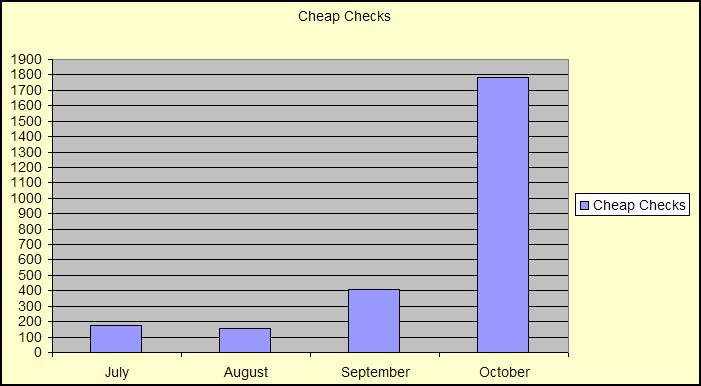
The excel chart below (please click on it to enlarge it and read it well) explains an interesting thing that happened to www.coolchecks.net as a result of posting content to the blog a regular basis.
Many hosting companies provide website owners with a way to measure their traffic through a program called the Cpanel. Cpanel lets the webmaster control a lot of things on a website, but the thing I like best is the daily reports it can give you about your website traffic.
For my four-month case study, using the Cpanel web stats, I charted the results of the traffic I received from the keyword phrase “cheap checks.” This phrase is important to the site because the site sells bank checks.
When I charted the results I could see a dramatic increase in hits during the month of October, for the keyword phrase “cheap checks.” I had only changed a few words on the home page of this site to try to boost the rankings for “cheap checks" and I posted to the web blog on a regular basis.
My monthly hits to the site with that keyword increased by 1273! So how did that translate into real progress financially? There was an increase in revenue from the site of $601.38.
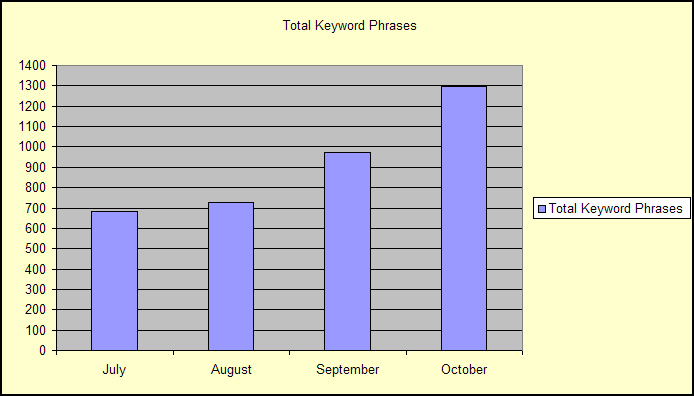
Examining the results from the chart above brought me to wonder about another statistic that I could easily pull from the Cpanel. I wanted to know how many search phrases were used during each month.
The chart below will show you the total number of keyword phrases used to bring people to my site over a four-month period of time.
You will notice a steady increase in keyword phrases. During October, there were 1299 keyword phrases people used to get to get to my site, while in July there were only 685. It appears that the number of keyword phrases almost doubled over four months.
There are several blogging tips you can learn from this keyword case study.
- Adding content on a regular basis can dramatically improve website traffic.
- The increase in traffic improves your keyword search results so you are ranked higher for the keyword you optimized for.
- More traffic means more revenue.
- Cpanel statistics are awesome and should be watched carefully.
- One keyword phrase that you rank well for can affect the other keyword phrases and bootstrap them to higher search result positions.
When you are developing your website business, don’t overlook the importance of a good keyword strategy and the power that it has to improve your financial condition.
| 3.5 |
How to use Google Maps in a WordPress post
September 12, 2008 by
Sherry Tingley
Filed under WordPress
This article will help you learn how to use Google Maps in a WordPress post. The first thing you need to do is to log in to your Google account from the Google Maps link. Then you'll need to add addresses that have some meaning to you or your community of friends or business associates. This may take some time, but it's worth it to get a global picture of the sphere of your influence.
You can log all of your favorite addresses and then click on satellite view.
Read more
Keyword Strategies for WordPress
September 7, 2008 by
Sherry Tingley
Filed under Blogging Tips, Featured, Key Words, WordPress
Keyword strategies are becoming easier to create with new tools available to WordPress bloggers and to individual web site owners. Ranking on the first page of Google results is not as difficult as you might think. With a little research and some good strategies in place, you can do quite well.
A keyword tool that is popular among many website developers is the Word Tracker Free Keyword Tool. You will find that it does the brainstorming for you by giving you alternate suggestions for other keyword phrases.
A tool you can easily use to help you determine which keywords to focus on is listed below:
Search engine optimization using good keyword strategies will help your site gain top positions on Google, MSN and Yahoo search engines. Just this weekend I tested some keywords for my site. I logged in to my Google Webmaster Tools account and found out that I was getting traffic from a variety of key words that I wasn't aware of.
The keyword results are listed below:
| Key Word | Date | Position | Number of Page Results |
| loved by many | 9/7/2008 | 7 | 135,000,000 |
| word mortgage | 9/7/2008 | 18 | 26,200,000 |
| 20 blog | 9/7/2008 | 4 | 22,200,000 |
| submit your blog | 9/7/2008 | 15 | 21,000,000 |
| top blog wordpress | 9/7/2008 | 7 | 17,300,000 |
| wordpress top blog | 9/7/2008 | 1 | 13,000,000 |
| personal finance stories | 9/7/2008 | 10 | 6,750,000 |
| wordpress blogging tips | 9/7/2008 | 6 | 2,380,000 |
| blogging tips | 9/7/2008 | 20 | 1,680,000 |
| blog submission directories | 9/7/2008 | 8 | 532,000 |
| blogging tips plugin | 9/7/2008 | 1 | 518,000 |
| blogging tips plugin for wordpress | 9/7/2008 | 1 | 513,000 |
| places to advertise a wordpress blog | 9/7/2008 | 1 | 356,000 |
| blog submission plugin | 9/7/2008 | 1 | 194,000 |
WordPress is extremely search engine friendly and with a Google Webmaster Tools account you can look up your results quickly and easily.
Another tool you can use to help you with your keyword strategies for your WordPress blog is one at www.technobloggie.com/keyword-tool . I really like that tool because it can tell you what your key word is worth in actual dollars and sense.
A very good key word strategy to use is to add a little hittail code to your site. www.hittail.com has a service that will track every keyword people use to get to your site with and it will create a long tail key word list for you, listing up to 300 key words. All of this is done with one line of code.
Another very useful site for overall search engine optimization is at: http://www.webconfs.com/
They host 20 powerful key word tools free for anyone to use, so be sure to take advantage of them.
With all the good key word tools available for WordPress bloggers and web site owners, there are numerous opportunities for you to rank high in the search engines.
If you have a tool you like to use, please suggest one.
http://www.seomoz.org/blog/my-personal-opinion-90-of-the-rankings-equation-lies-in-these-4-factors where you can read about some other good keyword strategies.
| 3.4 |
20 Top Blog Submission Directories in a WordPress Plugin
August 25, 2008 by
Sherry Tingley
Filed under Blogging Tips, WordPress
A new WordPress plugin has been created that will have direct links to 20 different places to submit your blog. These twenty blog submission directories are popular places to advertise your new WordPress blog. They appear as links inside the back office of your WordPress blog.
These links are great places to submit your blog to get traffic back to your URL. Some of the links go to blog tracking web sites like www.technorati.com where you can see tracking statistics and find out the popularity of your blog.
Some of the links, like the blog analyzer go to places that analyze your blog posts so you can see which of your posts are pulling the most traffic.
Other links are popular blog submission directories that have been recommended.
This is just a sample of how it will look in the back office of WordPress. You can see it in on the right side of the page when you use the write screen to write a post.If you want to suggest a blog submission diretory to be added to this list, please suggest one!
What does it cost?
I am releasing this 20 Top Blog Summission Directories WordPress plugin into the blogging community as “donation-ware“.
However, these plugins do take time to write, update, and provide support … so if you find it useful then please consider making a donation. You just click the button below and it will direct you to PayPal. You can donate any amount you wish.
| 3.8 (2 people) |
Blogging Tips Plugin for WordPress
August 7, 2008 by
Sherry Tingley
Filed under Blogging Tips, WordPress
Blogging has become a popular way of building a website and many times that website can become a lucrative business. Getting ideas to write about becomes difficult for some people and after they have written their first ten posts, they don't know what to write about. They need blogging tips.
One of the first plugins to be written for Word Press was a plugin called, "Hello, Dolly." Similar to the Hello Dolly format, which puts a line of lyrics in the upper right hand space in the Word Press Administration screen, the blogging tips plugin displays random blogging tips and suggestions. The tips are just some ideas of what you can do to improve the popularity of your blog and improve the content. All of the tips are designed to inspire you to be a better blogger.
It is easy to install plugins to your blog. You just download the zipped file and then open the folder on your computer. You read the installation instructions and then just upload one file to your blog. You will put it in the folder called plugins which is under the folder called wp-content. Then you look for the file in your plugins directory within your Word Press back office and find the plugin called "Blogging Tips." You click on activate. Be sure you deactivate the Hello Dolly plugin if you are currently using that. Enjoy the plugin.
Add a little fun to your Word Press blog and download this plugin for blogging tips.
What does it cost?
I am releasing this WordPress Plugin with Blogging Tips into the blogging community as “donation-ware“.
However, these plugins do take time to write, update, and provide support … so if you find it useful then please consider making a donation. You just click the button below and it will direct you to PayPal. You can donate any amount you wish.
| 2.5 |